

If you're selling your business, you're going to need a data room. It's where you'll store and share all the documents a buyer needs to evaluate your company during due diligence. And the quality of your data room directly affects how quickly your deal moves, how confident the buyer feels, and whether the deal closes at all.
I've worked with sellers who had everything organized before we even listed the business. Their deals moved fast. Buyers loved the professionalism. Due diligence took weeks instead of months.
I've also worked with sellers who scrambled to find documents on the fly, uploading things piecemeal over weeks. Those deals dragged on. Buyers got frustrated. Some walked away because they couldn't get comfortable with incomplete information.
A data room isn't complicated to set up, but it does require planning and attention to detail. Let me walk you through exactly how to do it right.
The data room is the first thing a serious buyer evaluates, and it tells them everything about how you run your business. A messy data room makes buyers wonder what else you're disorganized about.
What Is a Data Room and Why You Need One
A data room is a secure, organized repository where you store all the documents a buyer and their advisors will need during due diligence. In the old days, this was literally a physical room filled with filing cabinets and binders. Today, it's almost always a virtual data room (VDR), which is a cloud based platform designed specifically for sharing sensitive documents during business transactions.
The data room serves several purposes:
Central document hub. Instead of emailing documents back and forth (which is disorganized and insecure), everything lives in one place. The buyer, their attorney, their accountant, and their lender can all access the documents they need without you having to send individual files to each person.
Access control. Virtual data rooms let you control who can see what. You can grant different levels of access to different users. The buyer's attorney might see the legal documents. The buyer's accountant might see the financials. You control who sees what and when.
Activity tracking. Most VDR platforms track who viewed which documents and when. This gives you insight into what the buyer is focused on and how seriously they're evaluating the business. If a buyer downloads every financial document in the first two days, they're serious. If they haven't logged in after a week, they might not be.
Security. Virtual data rooms have security features like encryption, watermarking, download restrictions, and two factor authentication. This protects your sensitive information from being shared or leaked.
Professionalism. A well organized data room signals to the buyer that you're a serious, professional seller. It builds confidence and trust, which can translate directly into a better deal.
Choosing the Right Platform
You have several options for setting up your data room, ranging from free to expensive.
Dedicated Virtual Data Room Providers
These are purpose built platforms designed for M&A transactions. They offer the most features and the highest level of security.
Popular options include:
- Datasite (formerly Merrill Datasite): Enterprise level, expensive, used for large transactions
- Intralinks: Similar to Datasite, popular with investment banks and PE firms
- Firmex: Mid market focused, good balance of features and price
- SecureDocs: Affordable, designed for smaller deals
- Ansarada: AI powered features for due diligence management
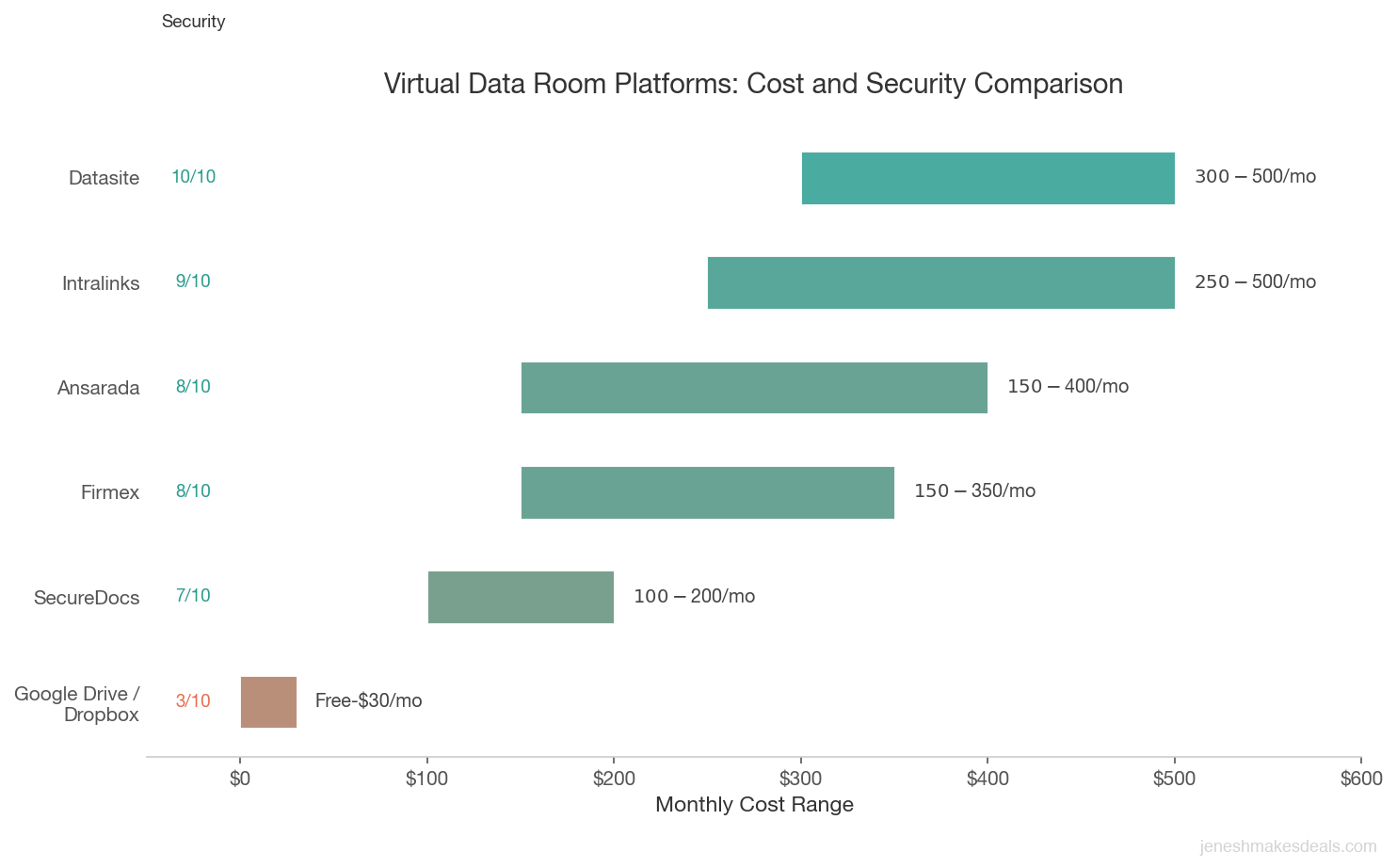
These platforms typically cost $100 to $500 per month depending on storage, features, and number of users. For a small business sale, a platform like SecureDocs or Firmex is usually sufficient.
| Platform | Best For | Monthly Cost | Key Strengths |
|---|---|---|---|
| Datasite | Large transactions ($10M+) | $300 to $500+ | Enterprise security, investment bank standard |
| Intralinks | PE and institutional deals | $250 to $500+ | Advanced analytics, global compliance |
| Firmex | Mid market deals ($1M to $10M) | $150 to $350 | Balance of features and affordability |
| SecureDocs | Small business sales (under $2M) | $100 to $200 | Simple setup, flat rate pricing |
| Ansarada | Deals needing AI document review | $150 to $400 | Automated categorization, readiness scoring |
| Google Drive / Dropbox | Very small deals (under $500K) | Free to $30 | Low cost, familiar interface, limited security |
Cloud Storage Alternatives
For smaller deals, some sellers use general cloud storage platforms like Google Drive, Dropbox Business, or Microsoft SharePoint. These are cheaper (sometimes free) but lack the specialized security features of dedicated VDR platforms.
If you go this route, make sure you:
- Use a business account, not a personal one
- Set up folder level permissions so users only see what they need
- Enable two factor authentication
- Use password protection on sensitive files
- Watermark documents with the recipient's name
- Disable download capabilities where possible
What Your Broker Provides
Many business brokers include data room access as part of their service. If you're working with a broker, ask if they have a VDR platform available. This can save you the cost and hassle of setting one up yourself.
Thinking about selling your business? Contact us for a free consultation and we'll help you set up a professional data room and manage the entire due diligence process.
How to Organize Your Data Room
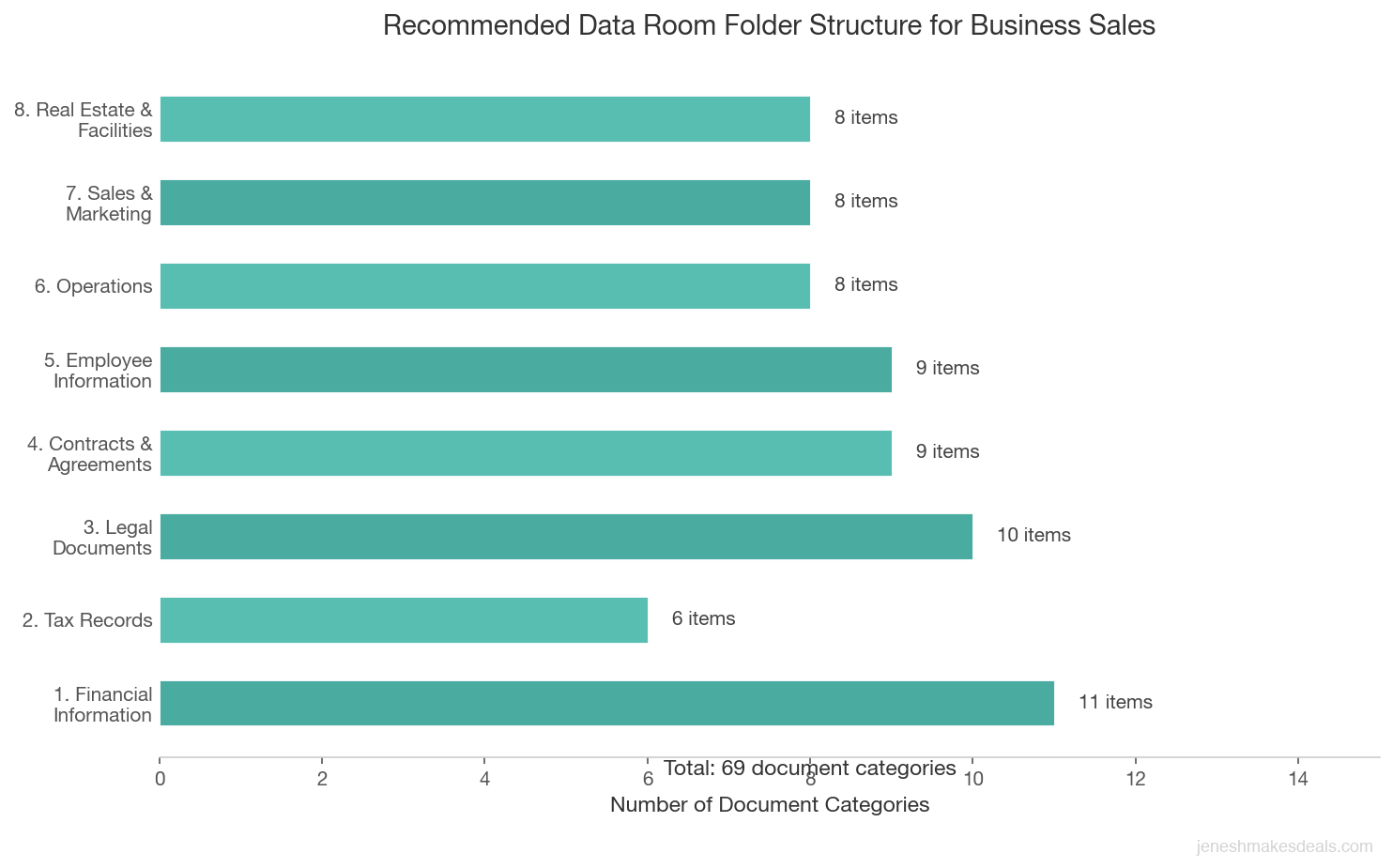
Organization is everything. A buyer who can't find what they're looking for gets frustrated fast. Here's the folder structure I recommend:
Folder 1: Financial Information
This is the most important section and the one buyers will review first.
- Income statements (profit and loss) for the past 3 to 5 years
- Balance sheets for the past 3 to 5 years
- Cash flow statements for the past 3 to 5 years
- Monthly or quarterly financial statements for the current year and prior year
- Tax returns (business and personal if sole proprietorship or LLC) for the past 3 to 5 years
- Accounts receivable aging report
- Accounts payable aging report
- Revenue breakdown by customer, product/service, and geography
- SDE or EBITDA calculation with add backs clearly documented
- Debt schedule showing all outstanding loans, lines of credit, and their terms
- Capital expenditure history for the past 3 to 5 years
Folder 2: Tax Records
- Federal and state tax returns for 3 to 5 years
- Sales tax returns and reports
- Payroll tax filings
- Property tax records (if applicable)
- Any correspondence with the IRS or state tax agencies
- Tax audit results (if any)
Folder 3: Legal Documents
- Articles of incorporation or organization
- Operating agreement or bylaws
- Any amendments to organizational documents
- Business licenses and permits
- Professional licenses (if applicable)
- Franchise agreement (if applicable)
- Insurance policies (general liability, property, workers comp, professional liability)
- Pending or historical litigation
- Intellectual property registrations (trademarks, patents, copyrights)
- Any governmental regulatory compliance documentation
Folder 4: Contracts and Agreements
- Customer contracts (redact customer names initially if confidentiality is a concern)
- Vendor and supplier agreements
- Lease agreement for the business premises
- Equipment leases
- Loan agreements and promissory notes
- Non compete or non solicitation agreements with employees or former partners
- Independent contractor agreements
- Partnership or joint venture agreements
- Any other material contracts
Folder 5: Employee Information
- Organization chart
- Employee roster with titles, tenure, and compensation
- Employee handbook and policies
- Benefit plans (health insurance, retirement, PTO)
- Employment agreements for key employees
- Independent contractor arrangements
- Workers compensation claims history
- Training programs and certifications
- Unemployment claims history
Folder 6: Operations
- Standard operating procedures (SOPs)
- Description of key business processes
- Technology systems and software (list with costs)
- Inventory list with current values
- Equipment list with age, condition, and maintenance records
- Safety records and OSHA compliance
- Quality control procedures and certifications
- Key performance indicators (KPIs) and dashboards
Folder 7: Sales and Marketing
- Marketing materials (brochures, website, social media)
- Customer list with purchase history (share later in due diligence)
- Sales pipeline and backlog
- Advertising and marketing spend by channel
- Customer acquisition cost data
- Customer retention rates
- Competitor analysis
- Market research or industry reports
Folder 8: Real Estate and Facilities
- Lease agreements with all amendments
- Property surveys and plats (if owned)
- Environmental assessments (Phase I and Phase II)
- Building inspection reports
- Zoning and land use documentation
- Property tax records
- Photos of the facility (interior and exterior)
- Maintenance and improvement records
Want to understand what your business might be worth? Try our free business valuation calculator to get a quick estimate based on your industry's typical multiples.
When to Start Building Your Data Room
The short answer is as early as possible. Ideally, you should start gathering and organizing documents 3 to 6 months before you plan to list the business.
Here's why starting early matters:
You'll discover missing documents. Almost every seller discovers during this process that they're missing something important. A lease amendment they can't find. Tax returns from 4 years ago. An employee handbook that was never finalized. Starting early gives you time to track these down without delaying the deal.
You'll find issues to fix. Organizing your documents often reveals problems you didn't know existed. Maybe your insurance policy lapsed and needs to be renewed. Maybe a vendor contract expired and needs to be renegotiated. Maybe an employee is misclassified as an independent contractor. Better to find and fix these things before a buyer's attorney does.
You'll be ready to move fast. When a serious buyer shows interest and signs the NDA, you want to give them access to the data room immediately. If you're still scrambling to upload documents, the buyer might lose interest or start wondering what you're hiding.
I tell every seller the same thing: the best time to build your data room is before you need it. The second best time is right now. Every week you delay is a week that could cost you a qualified buyer.
You'll present yourself professionally. A complete, well organized data room tells the buyer that you run a tight operation. This builds confidence and can actually increase the perceived value of the business.
What to Share and When
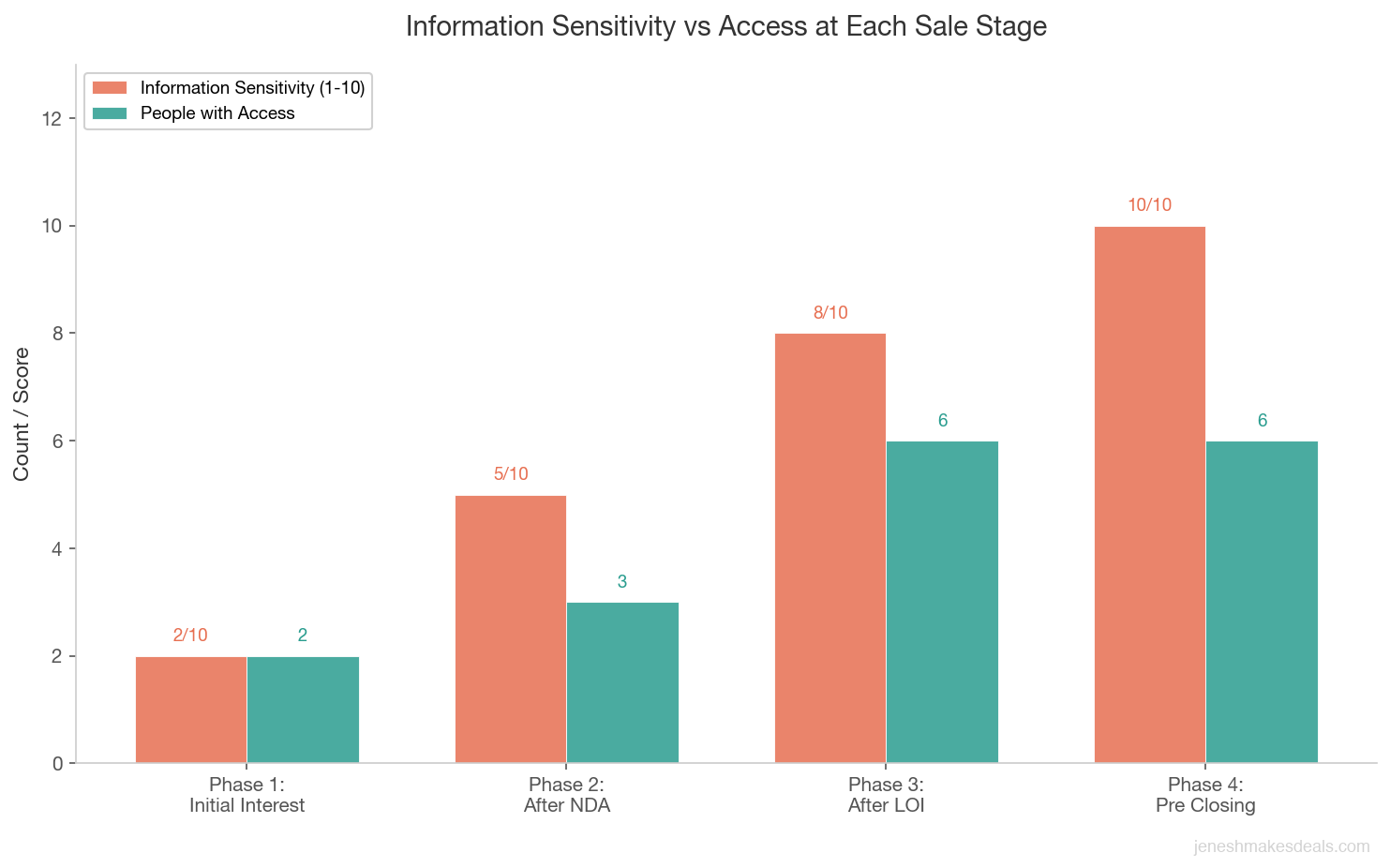
Not every document should be available from day one. I recommend a phased approach to sharing information:
Phase 1: Initial Interest (Before NDA)
Before the buyer signs an NDA, they should only receive the blind profile and general information. No documents from the data room are shared at this stage.
Phase 2: After NDA (Initial Due Diligence)
Once the buyer signs an NDA and is qualified, give them access to:
- High level financial summaries (not the detailed statements yet)
- General business description and operations overview
- Market and industry information
- Growth opportunities summary
Phase 3: Letter of Intent (Detailed Due Diligence)
After the buyer submits a letter of intent (LOI) and the major deal terms are agreed upon, open up the full data room:
- Detailed financial statements and tax returns
- Customer and revenue data (with names redacted initially)
- Employee information
- All contracts and agreements
- Legal and compliance documents
Phase 4: Purchase Agreement (Final Diligence)
In the final stages before closing, share the most sensitive information:
- Customer names and specific contract details
- Key employee compensation details
- Proprietary processes and trade secrets
- Any other highly confidential information
This phased approach protects your most sensitive information while giving the buyer enough data to make informed decisions at each stage.
| Phase | Timing | What to Share | Who Gets Access |
|---|---|---|---|
| Phase 1: Initial Interest | Before NDA signed | Blind profile, general business overview | Prospective buyer only |
| Phase 2: After NDA | NDA signed, buyer qualified | Financial summaries, operations overview, market data | Buyer and their primary advisor |
| Phase 3: After LOI | LOI accepted, terms agreed | Full financials, tax returns, contracts, employee data | Buyer, attorney, accountant, lender |
| Phase 4: Pre Closing | Purchase agreement in progress | Customer names, key compensation, trade secrets | Full deal team with individual logins |
Common Data Room Mistakes
Here are the mistakes I see most often:
Not organizing by category. Dumping hundreds of files into a single folder is a nightmare for buyers. Take the time to organize everything into logical categories with clear file names.
Using unclear file names. A file called "statement.pdf" is useless. Name it "Income Statement FY2025.pdf" so the buyer knows exactly what they're opening. Use consistent naming conventions throughout.
Including draft documents. Only put final versions of documents in the data room. If a buyer sees a draft that contradicts the final version, it creates confusion and erodes trust.
Not updating the data room. If the deal stretches over several months, your financials need to be updated regularly. The buyer should always have access to the most current information.
Sharing everything at once. As I mentioned above, use a phased approach. Sharing your customer list before the buyer has even submitted an LOI is unnecessary and risky.
Forgetting to watermark. Watermark every document with the recipient's name or company. If a document gets leaked, you can trace it back to the source.
Not tracking activity. Use the VDR's analytics to track who's viewing what. If the buyer's attorney is spending a lot of time on the litigation folder, that might signal they have concerns you should address proactively.
Pay close attention to what buyers are not looking at, too. If a qualified buyer signs the NDA but barely opens the data room, that's a red flag that they may not be serious or they've already moved on to another deal.
Ignoring version control. If you update a document, replace the old version entirely or clearly label the new one as "Revised" with the date. Having multiple versions of the same document in the data room causes confusion.
Tips for Making Your Data Room Stand Out
Beyond the basics, here are some things that separate a good data room from a great one:
Create an index document. Put a master index at the top level of the data room that lists every folder and every document with a brief description. This makes it easy for the buyer to find exactly what they need.
Include a Q&A section. Set up a dedicated folder or feature for questions and answers. When the buyer asks a question about a specific document, answer it in writing and add it to the Q&A section. This creates a permanent record and reduces repetitive questions.
Prepare a management presentation. Create a slide deck (10 to 15 pages) that summarizes the business, its financials, its competitive advantages, and its growth opportunities. This gives the buyer a quick overview before they dig into the details.
Add context to the financials. Don't just upload raw financial statements. Include a memo that explains unusual items, one time expenses, seasonal patterns, and anything else that might confuse the buyer when looking at the numbers.
Organize chronologically within categories. Within each folder, put documents in chronological order with the most recent first. This is how buyers naturally want to review information.
Highlight the good stuff. If you have a long term contract with a major customer, a recently renewed lease at below market rates, or a patent that protects your competitive position, make sure these documents are easy to find and clearly labeled.
Security Best Practices
Your data room contains your most sensitive business information. Take security seriously.
Limit access. Only give access to people who need it. Each user should have an individual login, and you should remove access promptly when someone is no longer involved in the deal.
Use watermarks. Watermark every document with the user's name or email address. This deters unauthorized sharing and makes it possible to identify the source of any leaks.
Enable two factor authentication. Require users to verify their identity through a second method (usually a code sent to their phone) before accessing the data room.
Set document permissions carefully. Some documents might be view only (no downloading or printing). Others might be downloadable. Think about each document and set the appropriate permissions.
Monitor activity. Review the activity log regularly. Look for unusual patterns, like someone downloading large numbers of documents late at night, or someone who shouldn't have access logging in.
Have a breach response plan. Know what you'll do if a document is leaked or if unauthorized access is detected. This might include notifying the buyer, changing passwords, revoking access, and consulting with your attorney.
The Bottom Line
A data room is one of the most important tools in a business sale. It's where the buyer forms their opinion about the quality and organization of your business. A clean, well structured data room accelerates the deal, builds buyer confidence, and can even increase the perceived value of your company.
Start early. Organize methodically. Share information in phases. Maintain security throughout the process. And if you're missing documents or finding issues as you build the data room, fix them before the buyer discovers them.
The work you put into your data room will pay off in a smoother, faster transaction and a better deal for everyone involved.
Need help figuring out what your business is worth? Use our free business valuation calculator to get a quick estimate based on your industry.
Ready to start preparing for a sale? Contact us for a free consultation and we'll help you build your data room, organize your documents, and position your business for the best possible outcome.
Related Articles

May 1, 2026
What Happens to Accounts Receivable When You Sell
AR is one of the most negotiated items in any business sale. Here's exactly how it's handled, valued, and who collects it after closing.

April 28, 2026
What Is Representations and Warranties Insurance
R&W insurance protects buyers and sellers in business sales by covering breaches of reps in purchase agreements. Here's how it works.

April 27, 2026
How to Handle Inventory in a Business Sale
Inventory can make or break a business sale. Here's how to value it, negotiate it, and avoid the disputes that kill deals at closing.
About the Author
Jenesh Napit is an experienced business broker specializing in business acquisitions, valuations, and exit planning. With a Bachelor's degree in Economics and Finance and years of experience helping clients successfully buy and sell businesses, he provides expert guidance throughout the entire transaction process. As a verified business broker on BizBuySell and member of Hedgestone Business Advisors, he brings deep expertise in business valuation, SBA financing, due diligence, and negotiation strategies.
You might also be interested in
Free Business Calculators
Try our business valuation calculator and ROI calculator to estimate values and returns instantly.
How to Buy a Business Guide
Download our comprehensive free guide covering everything you need to know about buying a business.
Our Services
Explore our professional business brokerage services including valuations and buyer representation.
More Articles
Browse our complete collection of business brokerage insights and expertise.